First Desktop of Summoner 7

This is exciting to create this poster with 14 characters in the demo

The Demo Screenshot of Summoner 7

Finally, all characters are in the demo!

First Elf in Summoner 7

Chuck Lin designed this character.

World map is done!

There are six big stages and 5 small stages in each of them.

Human Archer

My favorite character in Summoner 7.

June 04, 2010

ZBrush Normal Map making

Actually it was started from zshpere, but I adjust meshes in 3DSMAX.
It's a simple practice, and I did some mistakes while dividing meshes
So, I re-unwrap the UV after carving.


 Carved enough for normal map 


Using normal map tool in ZBrush to export Normal Map
Note: when it was exported, Y axis would be flipped


test the normal map in Unity 


June 03, 2010

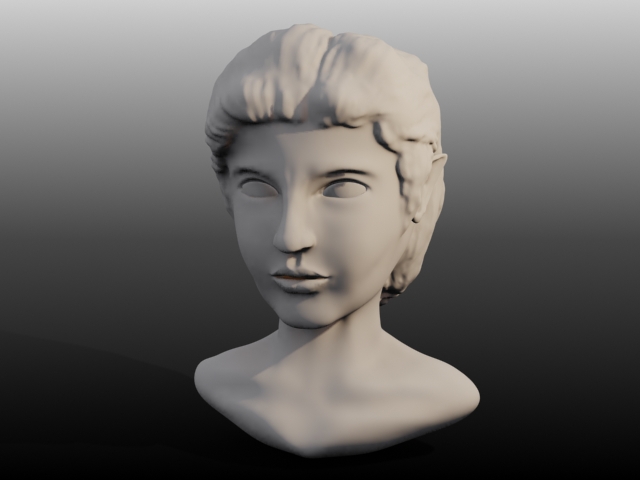
Zbrush Head Practice

It's a Greek teen
Base Model: ZSphere
Carve: ZBrush
Rendering: 3DSMAX


ZBrush process

May 11, 2010

Concept Art for Game Design Class

It's a concept art for a ruin city to fit our pitch project in our game design class.
The art combine two real photos and hand drawing to finish.
The little girl is the one character in the pitched game. I use a photo as a reference to re-draw it.
I intend to create a cute little girl to earn sympathy from players.

March 31, 2010

Xbox Avatar animation

The rigging file is from microsoft open source.
Platform is Maya.

March 16, 2010

First sample of Windows Mobile Phone 7

For the project rendering test, I have to test the newest XNA 4.0
which just has been released on March 15th 2010.
Let's see


In fact, XNA 4.0 is very easy to use.
However there are several different things from XNA 3.1.
For my situation, there is no more Renderstate class. So if you want to change
any renderstate in the phone, you have to create separate state instance to change that.
like:


DepthStencilState dp = new DepthStencilState();
dp.DepthBufferEnable = true;
dp.DepthBufferWriteEnable = true;
effect.GraphicsDevice.DepthStencilState = dp;

another important thing is: phone is not allowed custom shader
In this rendering testing, I used AlphaTestEffect (drawing city), and Basiceffect (drawing City)
Basically, for a phone, it is very easy to implement 3D environment.

March 09, 2010

Velvet shader implemented in XNA

Basically,
cause I'm doing a project about XBOX avatar,
I try to use the shader that MS used in avatars.
I guess that shader is based on velvet.
So, I mixed the velvet, distant lighting and skinned model shader together to animate my looney dog in XNA.

The pity is my velvet shader is based on vertex shading
I'll try to do in pixel shading next time.

January 28, 2010

NPR shading implementation (color distortion + cel shading)


NPR shading   
Tool: ATI Rendermonkey
Language: HLSL
Concept:  
These technique takes me 5 passes to finish it. And some passes need to be improved.
Pass 0: Cel shading
Pass 1: Color distortion
Pass 2: Normal
Pass 3: image based ink shading
Pass 4: Combination (Final)
As you can see, the technique includes three common shading, Cel, Color Distortion, and normal based ink.
The feature is the color distortion:

The idea of this shading is simple:
first the color has to be changed from RGB to HSV.
Then, sample one pixels from two special texture, and compare their value.
If their differential is bigger than X, the S and V of HSV value of the mapping pixel on rendertagart should be the average of the two sampling pixels.
However, my way to transform the color space has some problems
these step still needs to be improved


January 26, 2010

Tone Shader


Tool: ATI Rendermonkey
Language: HLSL
Concept:  
Basically, this technique can be done by two pass. First, I create a basic infinite light shading to render to texture. The rendertarget uses the alpha to store the shading result. In the final pass, I use a 2D texture which is my "tone" map to lerp the last pass result. Done! 
Key Code:
pass0:
float4 ps_main(float3 pos : TEXCOORD1, float3 nrm : TEXCOORD2) : COLOR
{
    float  diffuse = min(1.0,max(0,dot(-Light_Direction,nrm)));
    diffuse = pow(diffuse,5);
    diffuse = (diffuse*4)/3.0; 
    float4 Col = float4(1,1,1,diffuse);
    return Col;


}


Pass1:

float4 ps_main(float2 tex: TEXCOORD0) : COLOR0
{   
   float4 color;
   float4 base = tex2D(Texture0,tex);
   float4 hatch = tex2D(Texture1, tex);
   color = lerp(hatch , base, base.a) ;
   return color * base; 


}


Chinese Watercolor Shader Implementation (HLSL)

Tool : ATI Rendermonkey
Language: HLSL
Concept:
First, I use 3D-Based edge detection. Basically, all I need is the dot production of view-to-vertex vector and the vertex normal. Then, if the dot production is bigger than x (x can be thought as the ink width or the angle between the normal and view vector), I draw black texture on it. If the dot production smaller than x, I draw another texture on it.
Key Code:


VS_OUTPUT vs_main( VS_INPUT Input)
{
   VS_OUTPUT Output;
   
   float3 Nrm = normalize(Input.Normal);
   float3 ViewVec = normalize(Input.Position - viewPos);
   Output.edge = dot(Nrm, ViewVec);
   Output.Position = mul( Input.Position, mul(mul(view,projection),world));
   Output.Normal = Nrm;
   return( Output );
}


float4 ps_main(float edge:TEXCOORD0, float3 N1: TEXCOORD1) : COLOR0

{   
    float4 color; 
    float absV = abs(edge);
    if(absV
   {
      float2 findColor = float2(absV*2.5f, N1.x/2.0f+N1.y/2.0f);
      color = tex2D(Texture1, findColor);
   }
   else
   {
     float2 findColor = float2((1-absV)*1.666f, N1.x/2.0f+0.5f);
      color = tex2D(Texture0, 1-findColor);
   }
   return color;
}   
Here is another test: Ink Shading + Lambert Shading


January 11, 2010

Hugo's Game Projects Review 4: Bananarama


Project: Bananarama
Project Time: Dec/2009
Project Duration: 4 weeks 
Project Members: 5 people
My Role: Modeler / Animator 
Tools: 3DS MAX, Panda (3D engine)


Hugo's Game Projects Review 3: Minotaur


Project: Minotaur
Project Time: Nov/2009
Project Duration: 3 weeks 
Project Members: 4 people
My Role: Modeler / Animator 
Tools: 3DS MAX, Panda (3D engine)

Hugo's Game Projects Review 2: Qin Shihuang' Tomb


  Project: Qin Shihuang' Tomb
  Project Time: Oct/2009

  Project Duration: 2 weeks 
  Project Members: 4 people

  My Role: Modeler / Animator / Producer / 
  Tools: 3DS MAX, Panda (3D engine)

Hugo's Game Projects Review 1: Loony Balloony's Nightmare


Project: Loony Balloony's Nightmare
Project Time: Sept/2009
Project Duration: 2 weeks
Project Members: 4 people
My Role: Modeler / Animator / Shader
Tools: 3DS MAX, Panda (3D engine), NVIDIA FX Composer
Shaders: Radial Blur / Cel / Ink